What Automated Conflict Detection Actually Means
Ask a managing partner how their firm handles conflict checks and you will usually get a version of the same answer: someone searches the case management system, or the shared spreadsheet, or their email history for the prospective client’s name. If nothing comes up, the case is clean.
This is a reasonable starting point. It is not a conflict check.
A real conflict check is not a name search. It is a structured comparison of every person and entity associated with a new matter against every person and entity associated with every prior matter — across multiple match types, looking for relationships the firm may not have considered. Most manual processes cover one of these dimensions. The others go unexamined.
This post explains what thorough conflict detection involves, why manual processes fail at scale, and what to look for in an automated system. It also describes precisely what automated detection can and cannot do, because the marketing language in this category tends to overstate capabilities in ways that create false confidence.
What Most Firms Call “Conflict Checking” Today
The typical manual conflict check at a small to midsize plaintiff-side firm looks like this:
- A new potential client submits a form or calls the firm.
- Someone looks up the client’s name in the firm’s case management system, intake spreadsheet, or email archive.
- If no result appears for that name, the check is considered complete.
- If the firm uses a dedicated conflict checking module, the process may be slightly more structured — but it is still fundamentally a name lookup.
This process has a number of failure modes that are not obvious until something goes wrong.
It checks the client but not all parties. A conflict of interest does not only arise from representing a prior client who is now adverse. It can arise from a witness in the new case who was a client in a prior case. It can arise from an adverse entity that the firm represented in a different matter years ago. It can arise from a household connection — someone at the new client’s address who has a prior relationship with the firm. A name search that only checks the incoming client’s name against prior clients does not catch any of these.
It relies on spelling consistency. Manual searches fail when names are spelled differently across records. “Jon” versus “John.” “McDonald” versus “MacDonald.” A hyphenated name entered with and without the hyphen. A maiden name versus a married name. If the records do not match exactly, the search returns nothing — and the fact that nothing came up feels like confirmation of a clean record, not a data quality problem.
It has no audit trail. A conflict check that consists of someone typing a name into a search box leaves no record that the check was performed, when it was performed, what was searched, or what result came back. If a conflict surfaces later, there is no documentation that due diligence was done.
Why It Breaks at Scale
Manual conflict checking works reasonably well when a firm is small enough that the attorneys know every active case by memory. At five attorneys and 50 active matters, informal knowledge is plausible — not reliable, but plausible.
At 15 attorneys and 200 matters, email history becomes the conflict check system. Someone types a name into Gmail search and hopes the relevant engagement letter or intake form was indexed correctly.
At 30 attorneys and 500+ matters, the process is often described internally as “hope.” The person performing the check searches what they can, notes that nothing came up, and moves on. The surface area that is not being checked is invisible.
The scale problem is not just about attorney count. It is about the accumulation of historical data. A firm that has practiced for 10 years has a conflict database that spans a decade of clients, adverse parties, and witnesses — almost none of which is structured in a way that supports systematic querying. The risk is not proportional to firm size. It is proportional to the gap between the data that exists and the data that is being searched.
The Five Dimensions of Real Conflict Detection
Automated conflict detection is not one check. It is a set of structured comparisons, each designed to surface a different category of conflict. Here is what a thorough automated system checks:
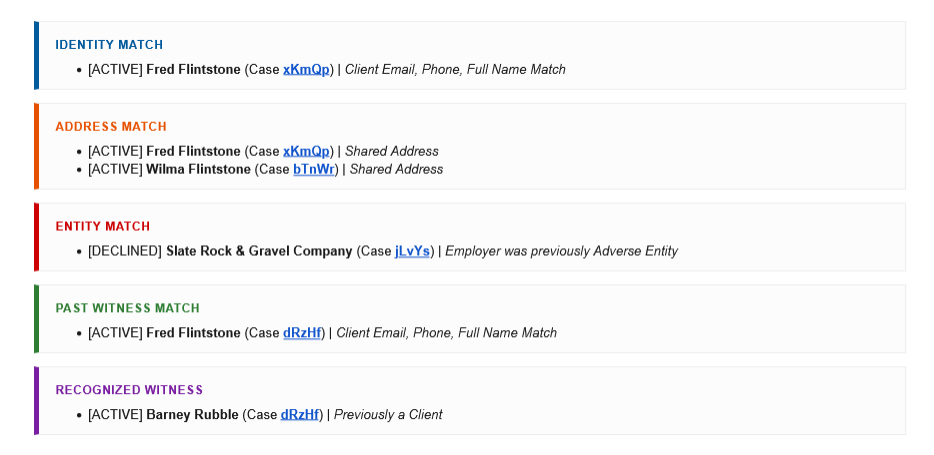
1. Direct Identity Match
The most basic check: does the incoming client match any person already in the database by email address, phone number, or full name?
This is the check most manual processes attempt. Automated systems do it better because they normalize the data before comparing — lowercasing names, stripping accents and special characters, removing extra whitespace — so that “María García” and “Maria Garcia” are treated as the same string. An exact search against unnormalized data misses this. The normalization step is necessary, not optional.
2. Shared Address (Household) Match
Does the incoming client share a physical address with anyone already in the database?
This check surfaces household relationships that a name search would miss entirely. If a prior client’s spouse or partner submits a new matter — using the same address but a different last name — a name-only search finds nothing. An address comparison finds the shared record and flags it for review.
Address matching requires its own normalization: stripping apartment numbers, unit suffixes, directional words (N, S, E, W), and common street type abbreviations so that “123 N. Oak Street, Apt 2B” and “123 Oak St” resolve to the same string for comparison purposes.
3. Adverse Entity Match
Does the adverse party named in the new intake match any entity or person previously listed as an adverse party in a prior matter?
This is a distinct check from the identity check because it applies to entities — employers, corporations, defendants — rather than individuals. Entity names require different normalization: stripping corporate suffixes (LLC, Inc, Corp, Ltd, LLP, PC) before comparison so that “Acme Corporation” and “Acme Corp” are treated as equivalent.
This check also uses token overlap matching — if more than half the normalized words in two entity names are shared, it flags the match for review. This is not phonetic matching or AI-based inference. It is word-level comparison after normalization. It catches “ABC Logistics Inc” versus “ABC Logistics” but will not catch “IBM” versus “International Business Machines.”
4. Prior Witness Match
Was the incoming client previously listed as a witness in a prior matter?
This check runs in both directions. It identifies cases where someone appearing as a client in the new matter appeared as a witness in a prior matter — a relationship that could create conflicts or at minimum provide useful intelligence about the case.
The same identity match logic applies: email address, phone number, and full name comparisons after normalization.
5. Recognized Witness Match
Are any of the witnesses listed in the new intake known to the firm from prior matters?
This inverts the prior witness check: instead of asking whether the incoming client is a known witness, it asks whether the witnesses the client has named are known to the firm. If a witness in the new matter was the adverse party in a prior case, or was a client in a different matter, that relationship warrants review.
This check requires that the intake form collect witness information in a structured format. Without structured witness fields, it cannot be performed.
What Automated Detection Cannot Do
It is important to be precise about the limits of this category of software, because the marketing around conflict detection often implies capabilities that do not exist in rule-based systems.
Phonetic matching is not typically included. Phonetic algorithms (Soundex, Metaphone) match names that sound alike — “Smith” and “Smyth,” for example. Most rule-based conflict detection systems, including sophisticated ones, do not include phonetic matching. This is a genuine gap. A name entered with an alternate spelling that does not resolve to the same string under normalization will not be caught.
AI-based inference is not a feature of most tools. Some vendors use the phrase “AI-powered conflict detection.” In most cases, this describes the same normalization and string matching logic described above, with a more expensive marketing claim attached. If a vendor claims AI-based conflict detection, ask specifically what the AI component does, what it learns from, and how its outputs differ from structured string matching. Vague answers to these questions are a red flag.
Historical data quality limits all automated checks. An automated system can only check against the data that exists in the database. If a firm’s historical records are incomplete, inconsistently entered, or stored in formats that cannot be queried, automated detection will miss conflicts that exist in the record but cannot be found. Data quality is a prerequisite, not an assumption.
The system flags — it does not decide. An automated conflict check produces alerts for human review. Whether a flagged match constitutes an actual conflict of interest is a legal judgment that requires an attorney’s assessment. The system surfaces the information; the attorney evaluates it.
The Audit Trail Requirement
ABA Model Rule 1.7 governs concurrent conflicts of interest. Rule 1.10 governs imputed disqualification. Most state bar rules track these closely. The rules themselves are widely understood. What is less widely practiced is the documentation requirement that good conflict checking implies.
When a conflict check is performed, the record of that check — what was searched, when, by whom, and what result was returned — is the evidence that due diligence occurred. If a conflict surfaces after a matter is opened and the firm cannot document that a check was performed, the malpractice exposure is substantially higher than if the check is documented and the conflict was genuinely not detectable at the time.
Manual conflict checks, by their nature, leave no record. An attorney who typed a name into a search box two weeks ago cannot reconstruct exactly what they searched, what terms they used, or what the database contained at that moment. An automated system that logs every check — date, time, match inputs, and results — provides exactly that record.
This is not a minor administrative benefit. In the context of a malpractice claim, the difference between “we performed a documented conflict check and found nothing” and “we don’t have a record of running a check” is the difference between a defensible position and a difficult one.
The Malpractice Math
The cost of a missed conflict is not abstract. Professional liability claims arising from conflicts of interest are among the most expensive in legal malpractice. Settlements in conflict-related malpractice cases frequently range from $50,000 to $500,000, depending on the size of the underlying matter and the nature of the conflict. Defense costs alone, regardless of outcome, can run $25,000 to $75,000.
For a firm with annual revenue of $1 million to $3 million, a single conflict-related malpractice claim at the low end of the settlement range represents a meaningful percentage of annual revenue — before factoring in professional liability premium increases, reputational impact, and the time cost of responding to the claim.
The firms most at risk are not large firms with dedicated risk management teams. They are small to midsize firms where conflict checking is informal, responsibility is distributed, and no one person owns the process.
What to Look For in a Conflict Detection System
If you are evaluating tools for conflict detection, here are the questions that matter:
Does it check all parties, or just the client? A system that only checks the incoming client against prior clients is checking one dimension of a multi-dimensional problem. Ask specifically whether it checks adverse parties, witnesses, and household connections.
What normalization does it apply before matching? Ask for a plain-English description of how names and entities are normalized before comparison. If the vendor cannot answer this clearly, the normalization is either minimal or opaque.
Does it check witnesses? Both incoming witnesses and the submitting party’s prior witness history should be checked. Many systems skip this.
What is logged? Every conflict check should produce a permanent log entry: what was checked, when, and what was found. Confirm that this log is accessible and exportable.
Where does the data live? If conflict history lives in a vendor’s proprietary database, you are dependent on that vendor’s uptime, pricing, and business continuity. If it lives in your own infrastructure — your own Google Sheets, for example — you control the data and can query it independently.
Does it run on every intake, automatically? Manual conflict checks only run when someone remembers to run them. Automated checks run on every submission, every time, without human intervention.
How LitiGator Handles Conflict Detection
LitiGator runs the five-layer check described above on every intake submission automatically, as part of the intake pipeline. It does not require a separate manual step.
Each check normalizes names, entities, and addresses before comparison. The five layers — direct identity, shared address, adverse entity, prior witness, and recognized witness — run against the firm’s People Database (a structured record of every client, adverse party, and witness from prior matters, maintained in the firm’s own Google Sheets).
Results are embedded in the attorney notification email, categorized by type and color-coded by severity. Every conflict check is logged permanently in the Ethical Wall Log, which records the timestamp, case ID, matched entity, and the action taken.
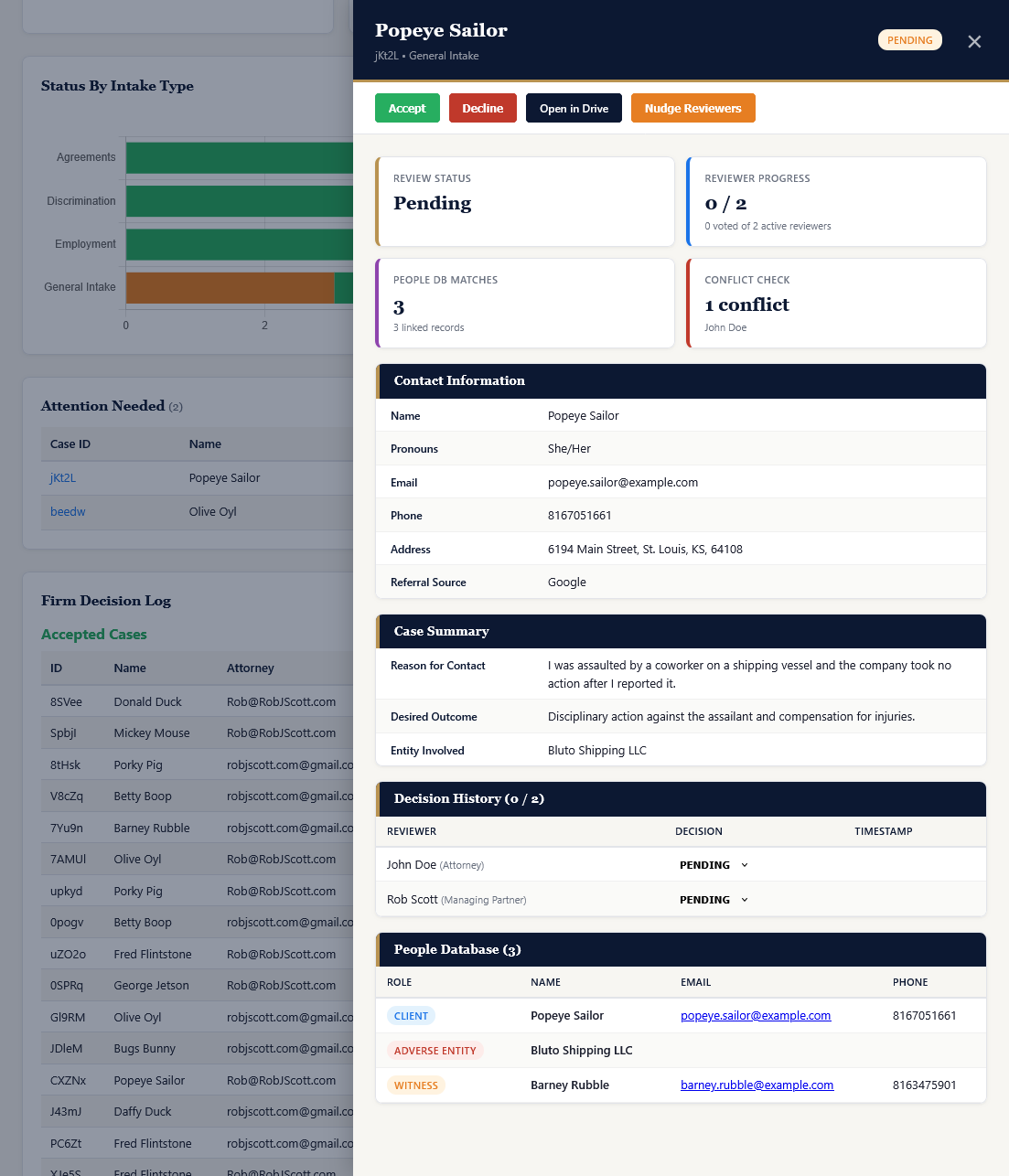
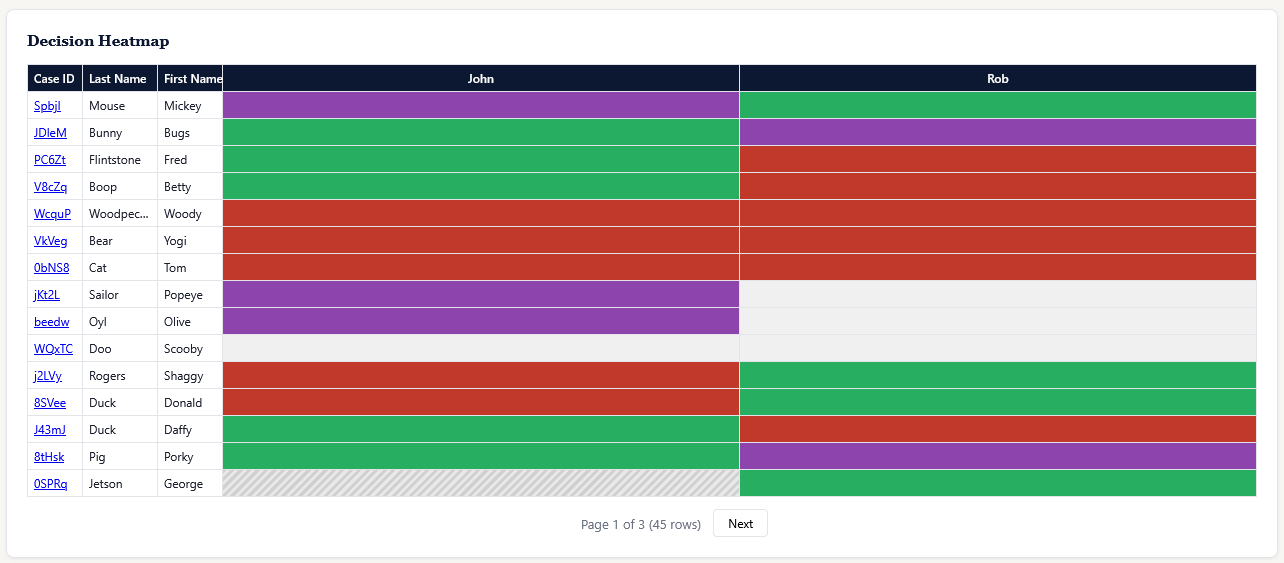
The system also maintains a separate ethical wall enforcement mechanism: if a reviewing attorney has a personal conflict registered against a party in a new case, they are automatically excluded from the notification, blocked from the case folder in Google Drive, and prevented from voting on the matter. This runs at the individual attorney level, not just at case acceptance.
LitiGator does not perform phonetic matching and does not use AI-based detection. It performs structured, normalized string and token comparisons against the firm’s own historical data. This is a precise description of what it does. Firms evaluating any conflict detection tool should ask for an equally precise description of what that tool does.
Where to Go From Here
If conflict detection is a gap in your current intake process, two resources are worth your time:
The LitiGator security and compliance whitepaper covers the full technical architecture, including how conflict data is stored, how the ethical wall enforcement works, and how audit logs are maintained.
The Intake Readiness Assessment includes a section on conflict detection that will help you identify specifically which dimensions of your current process are covered and which are not.
If you want to see the detection pipeline in action: book a demo.