Automated Legal Intake
Intake with teeth.
From intake form to attorney decision —
fully automated, built for Google Workspace™. No new software. No new accounts or passwords. No new risk.
Everything Your Intake Needs
Features that turn a web form submission into a reviewed, conflict-checked case file.

Branded Intake Form
Multi-step web form on your website, in your brand. Clients submit on their schedule.

Automatic Processing
Submission to case file in minutes — data entry, PDF summary, Drive folder, and team notification.

Five-Layer Conflict Detection
Identity, address, entity, past witness, and known witness checks on every single intake.

Ethical Wall Enforcement
Conflicted attorneys are silently excluded. They never see the case. Fully audited.

Attorney Notification
One-click Accept or Decline from email. 48-hour reminders. No login required.

Organized Case Files
Auto-created folders in your Google Drive™™ with proper permissions. Client upload access expires after 60 days.

Daily System Monitoring
7 AM health check email every day. Missing email = system is down. Silence is the alarm.

Zero-Infrastructure Security
No servers. No logins. No new infrastructure to secure. Runs entirely inside your existing Google Workspace.

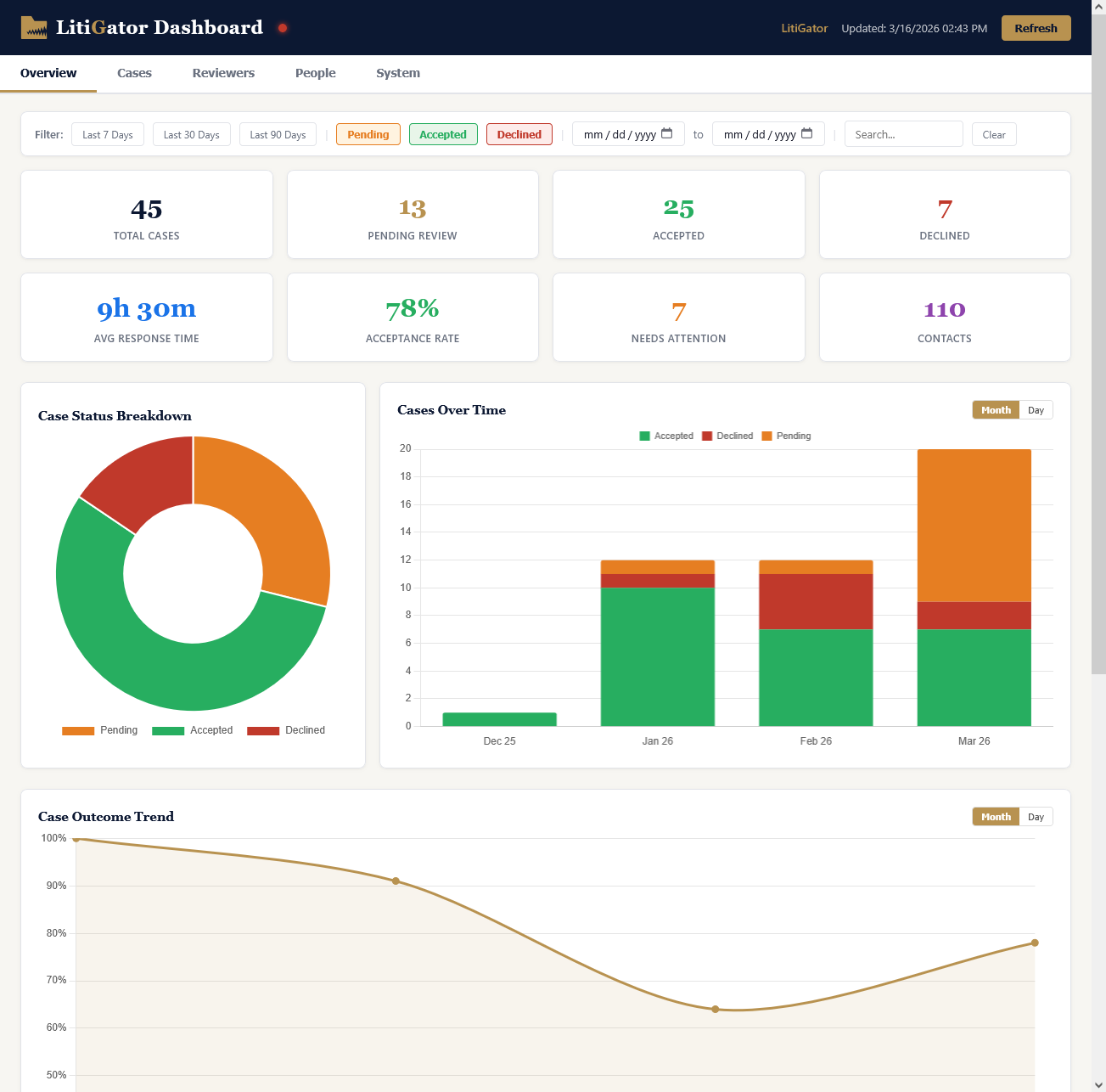
Operational Dashboard
Real-time visibility into your intake pipeline — case status, reviewer activity, system health, and actionable alerts in one tab-based interface.
From Form to Folder in Minutes
A potential client fills out your intake form. LitiGator handles everything else.
Client Submits Intake Form
A branded form on your website collects case details, timelines, witnesses, and file uploads — 24/7, any device.
Data Processed Automatically
Every field parsed, validated, and written to your spreadsheet. Every file captured. Zero data entry.
Five-Layer Conflict Check
Every party screened against your full case history — prior clients, adverse entities, witnesses, and household connections. Color-coded alerts.
Case Folder Built in Drive
PDF summary, uploaded evidence, client upload subfolder, private internal folder — structured and permissioned automatically.
Full Case Briefing Sent
Attorneys get a detailed email — client info, summary, conflict alerts, timelines, and document links — from your firm's own Gmail.
One-Click Accept or Decline
Two buttons in the email. One tap opens a pre-filled reply. No portal, no login. Send from any device.
Decisions Logged & Resolved
Every vote recorded with name and timestamp. First accept claims the case. 48-hour reminders ensure nothing slips.
Stop Losing Cases to Your Inbox
Every manual step is a chance for a lead to slip away, a conflict to go unchecked, or an ethics obligation to go unmet.
Your Client Data Stays in Your Google Workspace
Every security control your firm already configured — MFA, SSO, DLP, device management, audit logging — applies automatically.
AES-256 Encryption at Rest
Your data is encrypted at rest by Google Drive, Sheets, and Gmail using AES-256 — the same encryption your firm already trusts for email and documents.
No New Credentials
No passwords, no sessions, no login page. Reviewers sign in with their existing Google Workspace accounts.
No Vendor Data Storage
Case data lives in your Google Workspace, not on our servers. If we disappeared tomorrow, your data is exactly where it has always been.
Ready to automate your intake?
Live in under a week. Flat-rate tiers. No new accounts or passwords.