
The System Watches Itself — And Reports to You Every Morning
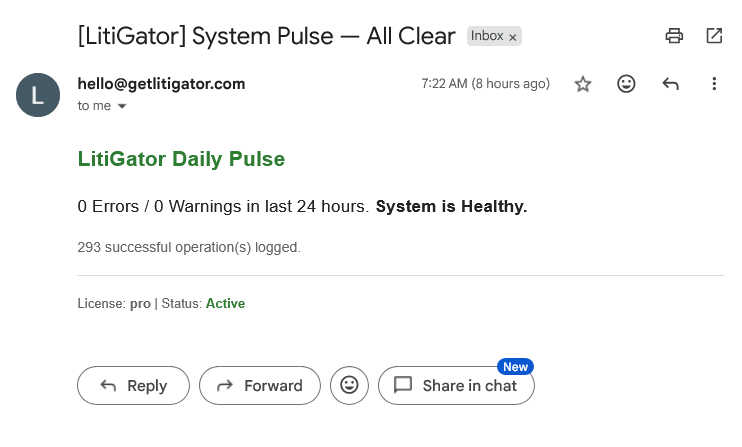
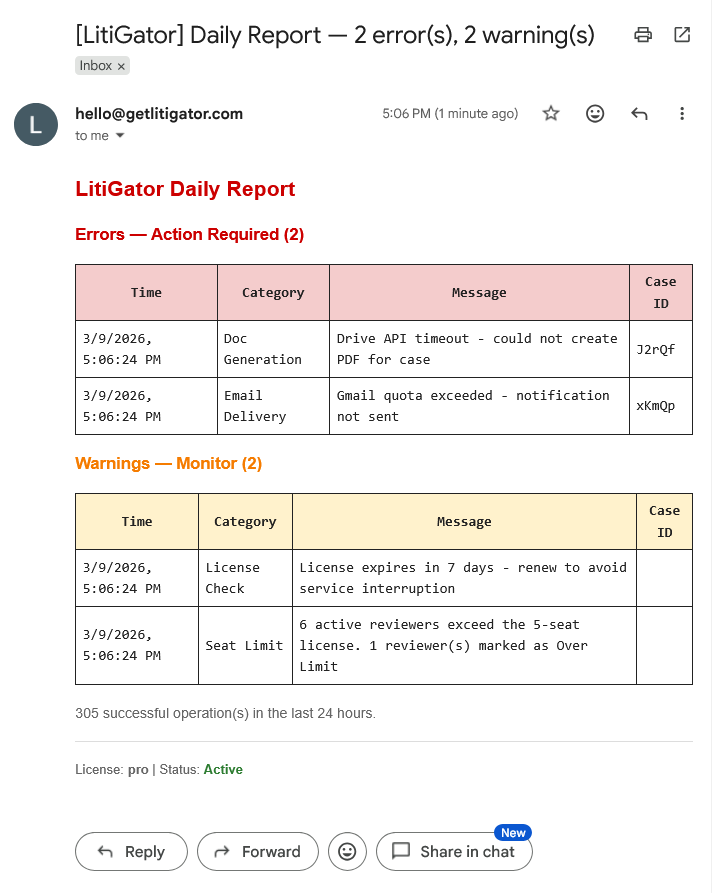
Every day at 7 AM, LitiGator sends a system health email. Clean day: green “All Clear” with a success count. Issues detected: red alert table with specific errors and yellow warnings. If the email doesn’t arrive, that itself is the alert — the system has stopped.
No monitoring tools to check. No dashboards to remember. Silence is the alarm.
Why It Matters
- No monitoring tools to check
- No dashboards to remember to log into
- Problems surface automatically — you never have to go looking
- Dead man’s switch design — if the email stops, something is wrong
The Daily Pulse Email
All Clear
On a clean day, you get a green “All Clear” with a count of successful operations since the last report.
Errors Detected
When issues occur, the email shows a red alert table with specific error messages, timestamps, and affected cases. Warnings appear in yellow.
Behind the Scenes
A color-coded System Logs sheet records every operation: green for success, red for errors, orange for warnings. The log auto-archives when it exceeds 1,000 rows, keeping the active sheet fast and focused on recent events.
A daily backup of the entire spreadsheet runs automatically, with 30-day retention. If something goes wrong, you have a month of snapshots to recover from.
Key Details
- 7 AM daily email — arrives every morning, no action needed on clean days
- Color-coded logs — ERROR (red), WARNING (orange), SUCCESS (green), INFO (blue)
- Auto-archiving — logs rotate automatically to keep the sheet performant
- Daily backups — 30-day rolling snapshots of the entire spreadsheet