
Automated Conflict Checks — On Every Single Intake
Every new submission is automatically screened against your firm’s complete history of clients, adverse parties, and witnesses. Five separate checks run simultaneously, catching connections that memory-based processes miss.
Catches conflicts that memory-based checks miss — on every intake, without exception.
The Five Layers
Each new intake runs through five independent conflict tracks:
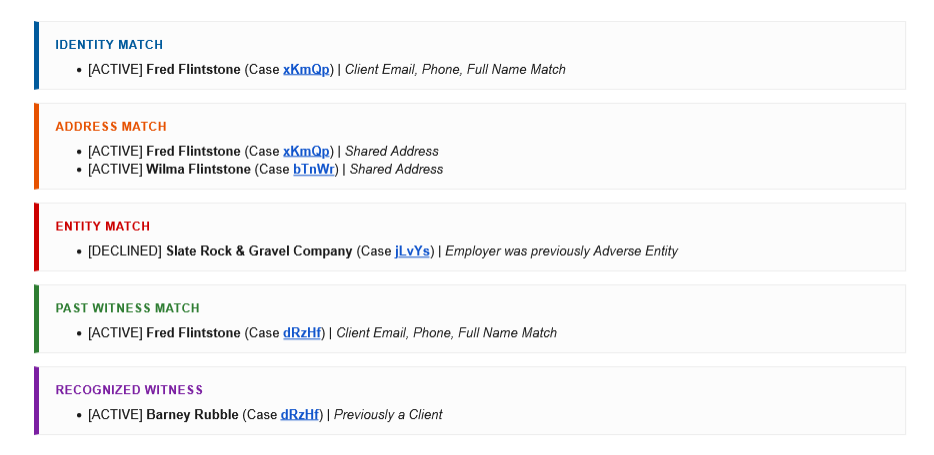
- Identity Match — Client appeared in a prior case (same name, email, or phone)
- Address Match — Same address as a known person, flagging possible household connections
- Entity Conflict — Adverse party matches a known entity from another case
- Past Witness — New client was previously listed as a witness in another matter
- Known Witness — A witness in this case already exists in your records from a prior matter
Color-Coded Conflict Alerts
Each conflict type gets a distinct color in the notification email, so attorneys can identify the type and severity at a glance.
Why It Matters
- Catches conflicts that memory-based checks miss
- Runs on every intake — no exceptions, no manual steps required
- Color-coded alerts in notification emails make issues instantly visible
- Each alert links back to the related prior case for quick review
Smart Matching
Entity names are normalized before comparison. “Globex Corp,” “Globex Corporation,” and “GLOBEX CORP.” all match. Address normalization handles formatting differences. Name matching accounts for common variations.
Alerts appear in both the notification email (color-coded boxes) and the PDF case summary. Each match includes the prior case outcome — active, accepted, or declined — so reviewers have full context immediately.
Key Details
- Entity normalization — catches variations in company names and business suffixes
- Color-coded alerts — each conflict type has a distinct color in notification emails
- Prior case context — each match shows the related case outcome
- Complete history — maintained in the People Database for ongoing reference